Tasks
A task is one action, with an optional due date, priority, time estimate and notes.
Adding a task
Name the action itself: “Email Dr. Chen to move the appointment” rather than “doctor”. Then, if useful:
- Notes: a phone number, a link, a first step. Lists and links work as in markdown.
- Priority: low, medium, high or urgent. Higher priority sorts first.
- Minutes: your estimate, 25 unless you change it. The focus timer starts with it.
- Due date: leave it empty and the task goes under Anytime.
The + beside Save keeps the form open for the next task.
The list
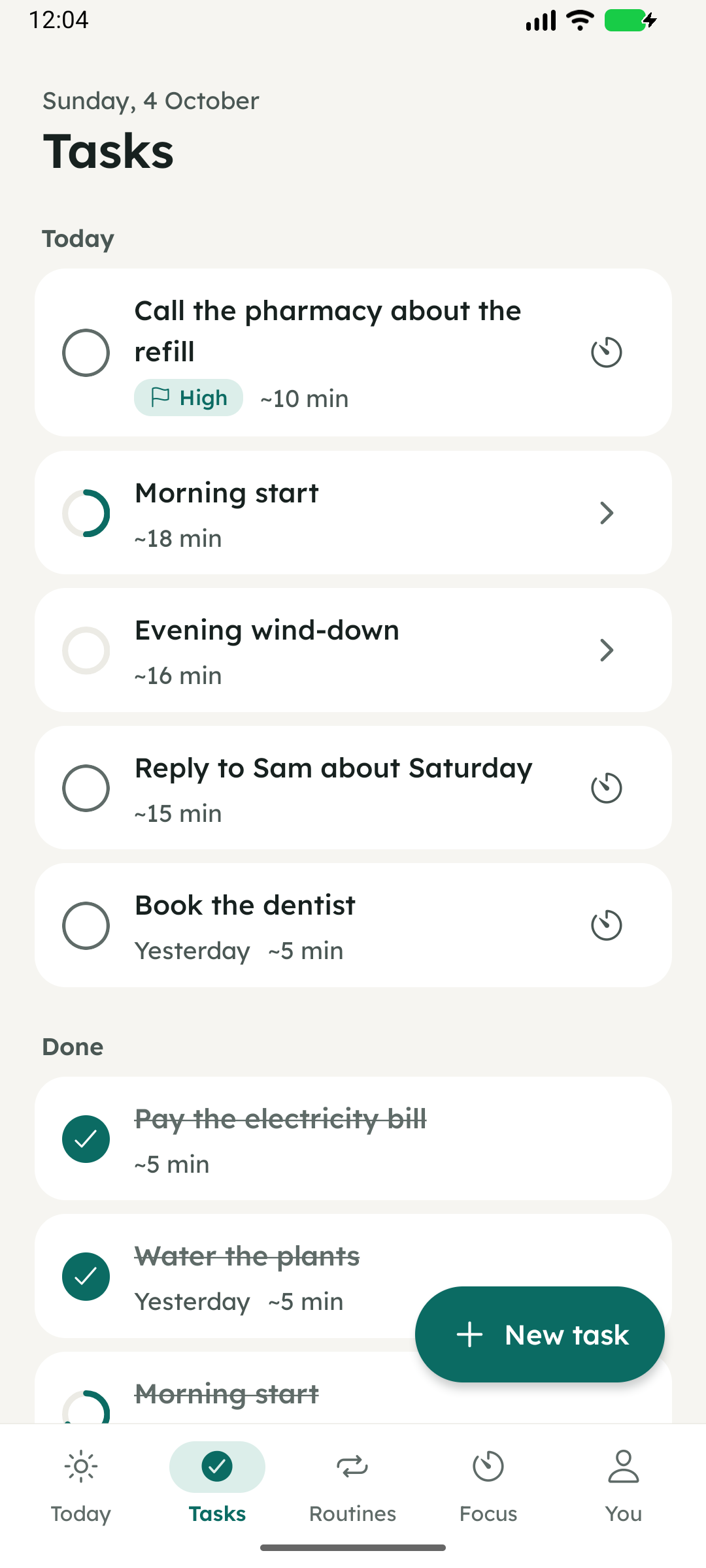
Tasks are grouped as Anytime, Coming up, Today (including anything from earlier days) and Done, top to bottom. The list opens at Today. If you scroll away, Back to today brings you back.
Today’s routines appear in the list as one row each, with a progress ring. Tap one to open it.
Done, tomorrow, later
- Tap the circle, or swipe left and tap the check, to mark a task done.
- Swipe right and tap the calendar to move it to tomorrow. Press and hold the calendar for 2 or 3 days, next week or next month.
- Open a task and choose Stash to hide it completely for a day, a few days, a week or a month. It comes back on its own. While anything is stashed, a button beside the Tasks title lists it.
Focusing on a task
The timer button on a task opens the focus timer with the task’s estimate (up to 60 minutes) and its notes on screen. Mark done there finishes the task without leaving the timer.
What tasks aren’t
There are no subtasks: if something has several parts, make several tasks. Anything you do every day belongs in a routine.